
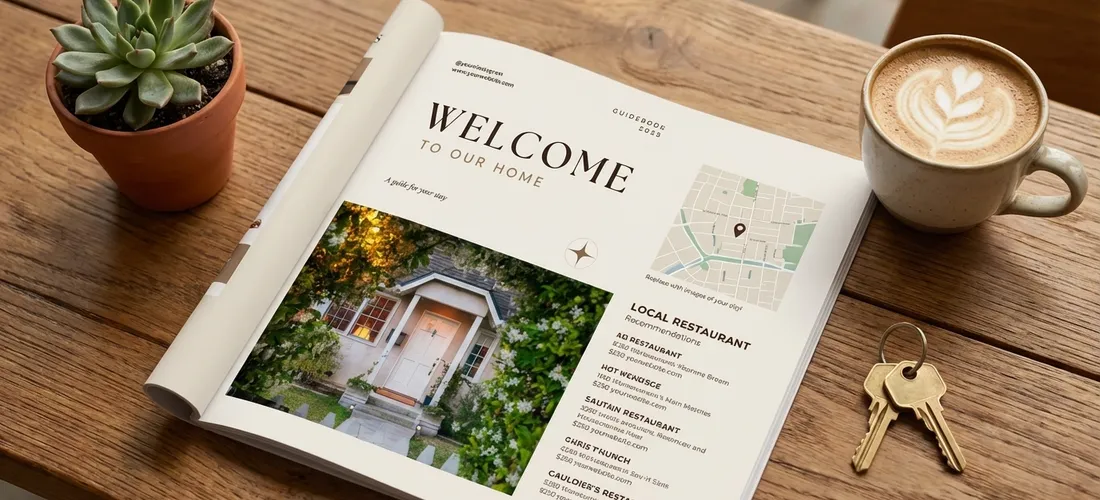
Every Airbnb host has gotten that 3 a.m. text: “Hey, what’s the WiFi password again?” A professional guest guidebook stops that. It answers every common question before guests even think to ask, and it signals the kind of care that earns five-star reviews.
This guide covers everything you need to know: what a welcome book template is, what to put in it, how to build it in Canva, and which template is actually worth buying.
Table of Contents
- What is an Airbnb Welcome Book Template?
- What Should Be Included in an Airbnb Welcome Book?
- How to Make a Welcome Book for Airbnb on Canva
- Do You Really Need a Welcome Book for Airbnb?
- Digital vs. Printed Airbnb Welcome Book
- How Long Should an Airbnb Welcome Book Be?
- What Is the Best Airbnb Welcome Book Template?
What is an Airbnb Welcome Book Template?
An Airbnb welcome book template is a pre-designed document, usually built in Canva, that hosts customize with their property’s specific information. Think of it as a fill-in-the-blanks guest guidebook: the layout, fonts, sections, and design are already done. You swap in your own photos, WiFi credentials, house rules, and local recommendations.
Templates exist because building a welcome book from scratch is time-consuming and easy to get wrong. A good template gives you structure (so you don’t forget important sections), professional design (so guests take it seriously), and a format that works whether you print it or share it digitally.
Most Airbnb welcome book templates are sold as Canva files, which means no design software or skills are needed, if you can click and type, you can customize one.
What Should Be Included in an Airbnb Welcome Book?
A strong welcome book covers every question a guest might have before they reach for their phone. Here’s what to include:
1. Welcome Note
Start with a warm, personal greeting. Tell guests a little about yourself and what you love about hosting. This sets the tone for the entire stay. A brief sentence or two about the neighborhood adds an extra personal touch guests appreciate. (Hostaway)
2. Check-In and Check-Out Information
- Check-in time and method (key lockbox code, smart lock instructions)
- Check-out time and any required tasks (strip beds, take out trash, etc.)
- Parking instructions
- Where to find extra towels, blankets, or toiletries
3. WiFi Details
Put this on the first full page. It’s the first thing every guest wants. Make it large, clear, and impossible to miss. (Lodgify)
4. House Rules
Write your rules in a warm, human tone rather than a legal one. Instead of “NO SMOKING,” try “This is a non-smoking home, we appreciate your respect for that.” Guests comply more readily when rules feel like requests from a person, not a policy document.
Must-cover rules:
- Quiet hours
- Smoking policy
- Pet policy
- Maximum occupancy
- Trash and recycling
5. Appliance Guides
Cover everything that isn’t immediately intuitive: the coffee maker, thermostat, TV remote, washer/dryer, outdoor grill. A single confusing appliance can tank a review. (HostGPO)
6. Emergency Contacts
Include your phone number, a backup contact, the nearest hospital or urgent care, and any building-specific emergency numbers (front desk, maintenance, HOA).
7. Local Recommendations
This is where you go from good host to great host. Share:
- Your top 3-5 restaurant picks (with a one-line note on why you love them)
- Coffee shops, grocery stores, pharmacies
- Activities and attractions, especially things not on every tourist list
- Transportation options: nearest metro, rideshare tips, parking tips
Guests remember and mention local recommendations in reviews more than almost anything else. (Futurestay)
8. Things to Know About the Property
Any quirks, tips, or features that make your place special:
- “The shower takes 45 seconds to get hot”
- “There are extra pillows in the hall closet”
- “The back patio is the best spot to watch the sunset”
How to Make a Welcome Book for Airbnb on Canva
Canva is the go-to tool for Airbnb welcome books because it’s free to use, beginner-friendly, and produces print-ready PDFs. Here’s how to build one:
Step 1: Start with a template Go to Canva and search “welcome book” or “guest guidebook.” You’ll find free options, but the free ones tend to be generic. A paid template designed specifically for Airbnb hosts (like the ones made by actual Superhosts) will have the right sections already built out. (The Wandering Tourists)
Step 2: Add your property photos Replace the stock images with photos of your actual space. Use your best listing photos. For the local section, use photos of the neighborhood or specific spots you recommend.
Step 3: Fill in your information Work through each section and replace the placeholder text with your actual details. Don’t skip sections, even a brief answer is better than a blank page.
Step 4: Adjust colors and fonts to match your brand If you have a brand color or a specific aesthetic for your property, match the guidebook to it. Consistent design signals intentionality.
Step 5: Download as PDF Export as “PDF Print” for a high-quality printed version, or “PDF Standard” for a smaller digital file you can share via link or email before guests arrive.
Time estimate: Starting from a well-built template, most hosts finish in 60-90 minutes. Starting from scratch in Canva takes 3-5 hours.
Do You Really Need a Welcome Book for Airbnb?
Yes, and the data backs it up.
Hosts who provide a comprehensive welcome book consistently report fewer guest messages during stays, better review scores in the communication and check-in categories, and higher rates of guests mentioning “thoughtfulness” and “detail” in public reviews. (Smoobu)
Guests won’t always tell you something was confusing or unclear. They’ll just leave a four-star review. A well-designed welcome book prevents that by setting clear expectations from the moment guests walk in the door.
For new hosts, a welcome book also projects credibility. It signals: this person takes hosting seriously. That matters more than you’d think, especially for guests who are comparing two similar listings. (Little Hotelier)
One practical test: look at your last ten guest messages. If more than two or three asked questions that a welcome book would have answered, you need one.
Digital vs. Printed Airbnb Welcome Book: Which Is Better?
Both have real advantages. The best approach for most hosts is to use both.
Digital Welcome Book
- Share via link or email before check-in, guests arrive already knowing the WiFi password
- Easy to update when things change (new checkout time, new restaurant recommendation)
- Accessible on phones without printing
- Works well as a QR code posted in the property
Printed Welcome Book
- Sits on the kitchen counter or coffee table, guests actually pick it up and read it
- No battery, no internet connection required
- Creates a tangible, hotel-like experience guests comment on in reviews
- Especially valuable for older guests or those traveling internationally without data
Many Superhosts use a printed binder for in-property reference and a digital PDF shared before arrival. If you can only do one, go digital, you can update it instantly and guests have it before they ever arrive. (Touchstay)
How Long Should an Airbnb Welcome Book Be?
Between 8 and 15 pages is the sweet spot for most properties.
Long enough to cover every section a guest needs; short enough that a guest who just landed after a six-hour flight will actually read it. A 30-page manual is impressive to build and overwhelming to receive.
If your property has unique features (a hot tub with specific instructions, a smart home system, a complicated parking situation), add the pages you need. Just make sure every page earns its place, if a section can be summarized in two bullet points, keep it to two bullet points.
Use a table of contents at the front so guests can jump to what they need without reading cover-to-cover.
What Is the Best Airbnb Welcome Book Template?
Most templates on the market come from graphic designers who have never hosted a guest. They look good but miss the sections that actually matter, or include sections hosts don’t need.
The Complete Airbnb Guidebook by Shana Designs is different. It was built by Shana, an active Airbnb Superhost and Guest Favorite who has hosted hundreds of stays. Every section in the template exists because real guests needed it. Every design choice reflects what actually gets read versus what gets ignored.
What’s included:
- Warm, personalized welcome page
- Check-in and checkout instructions
- House rules written in a guest-friendly tone
- WiFi and appliance quick-reference guides
- Local recommendations section (restaurants, activities, hidden gems)
- Emergency contacts page
- Fully editable in Canva, no design skills required
Price: $29 (current launch special)
Most hosts finish their custom guidebook in under 60 minutes. For one sale, it pays for itself many times over.
Final Thoughts
A welcome book is one of the highest-ROI investments an Airbnb host can make. It costs a few dollars and a couple of hours to build, and it works for every guest, for every stay, indefinitely.
The fastest way to get yours done: start with a template designed by someone who has actually used one. Skip the generic Canva search results. Use something built by a host, for hosts.
Grab the Shana Designs Airbnb Guidebook Template and have your professional welcome book ready before your next guest checks in.